The Hackaday community has answered the call and put their computers put to work folding proteins found in the coronavirus. Team_Hack-a-Day ranks #44 in the world so far this month, and I’ve seen us rank as high as #19 on 24-hour leaderboards.
Want to join the fight? Donate some of those computing cycles you’re not using to battling SARS‑CoV‑2. You’re probably not an epidemiologist or a vaccine researcher, but you can make their jobs easier by providing them with the data they need through the Folding@home Project.
As Dan Maloney explained in his excellent article on protein folding, understanding the incredibly complex folding behavior of the proteins in the virus will be key to finding treatments and possibly a vaccine. Folding@home connects countless computers via the internet and is now the largest supercomputer in the world, consisting of over 3.5 million CPUs and over half a million GPUs. The resulting data is freely available to researchers.
Let’s take a look at how easy it is to get up and running, how a GPU can supercharge a setup, and dip into the stats for Team_Hack-a-Day’s effort.
Setup is Simple
Your computer can be up and folding in ten minutes:
- Installation Guides
- There are also alternate download locations available
- Choose any alias you’d like to use for publicly displayed leaderboard
- Use team number 44851
- Optional: set up your own passkey
That’s it! But you’ll get more bang for your processing buck if you have a powerful video card in the mix. I finally got my own GPU running on the system and it quintupled my impact.
A Somewhat Dubious Guide to Linux GPU Setup
I have an Nvidia GeForce GTX 1050 Ti video card and I don’t game on this machine (unless you count Minecraft) so I might as well put it to good use folding proteins! Unfortunately, I couldn’t find a guide and the setup took me a while to work out. Hopefully by documenting my experience I can help others get their systems up and running a bit faster.

Folding@home can use GPUs via open OpenCL or CUDA (Nvidia cards only). I didn’t know exactly which packages I needed so I just installed them all. That’s why I call this a dubious install guide, you might not need all of these packages — for me, this install took about 1.5 GB of additional disk space. One note, I already had nvidia-driver-435 installed and used this command for the rest:
sudo apt install \
    ocl-icd-libopencl1 \
    ocl-icd-opencl-dev \
    ocl-icd-dev \
    nvidia-opencl-dev \
    nvidia-cuda-toolkit
I restarted the Folding@home client: sudo /etc/init.d/FAHClient restart. However, this didn’t enable the ability to add a GPU in the Configuration–>Slots menu. I first needed to edit the configuration file itself and change the “gpu” value to true:
  <!-- Folding Slot Configuration -->
  <gpu v='true'/>  <!-- If true, attempt to autoconfigure GPUs -->
I once again restarted the client, then enabled the GPU using the add button found in the Configure–>Slots window of the FAHControl program. Alternatively you should be able to edit the config file directly and restart the client for it to take effect:
  <!-- Folding Slots -->
  <slot id='0' type='GPU'>
    <idle v='true'/>
  </slot>
  <slot id='1' type='CPU'/>
Note that there’s a bit of extra magic in this configuration. After waiting about 90 minutes my GPU was assigned its first work unit (WU) and began folding, at which point my computer became totally unusable. Luckily the idle setting is how you workaround this — it instructs the client to pause folding whenever the computer is in use. You can configure it per slot, so here I have my CPU folding all the time and my GPU only folds when I’m not using my computer.
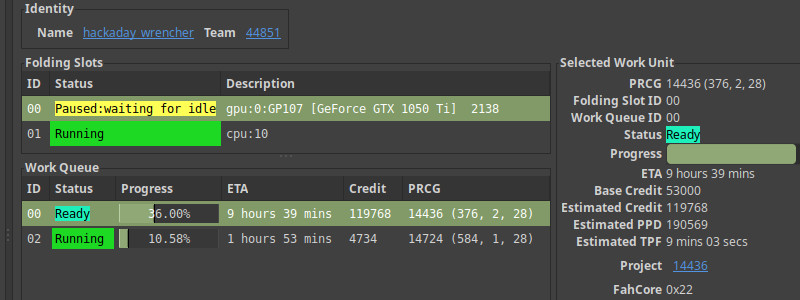
You can set the idle behavior by right-clicking the slot in the FAHControl GUI and choosing “on idle”. My CPU can fold for about 60,000 points a day, my GPU can fold for over 200,000 points per day. Figuring out this setup greatly increases my ability to contribute WUs to the effort!
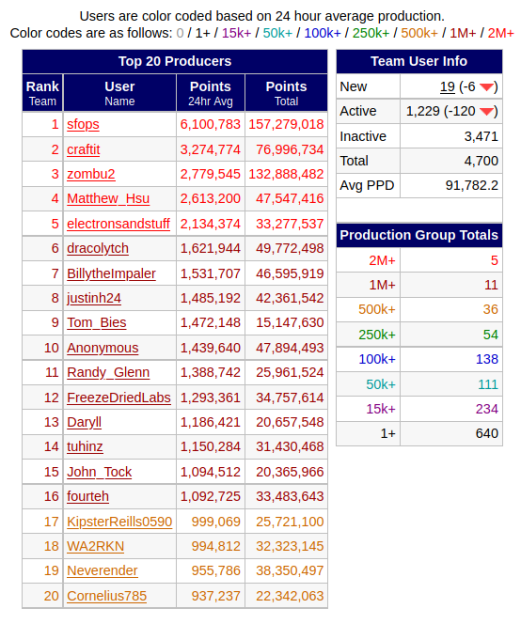 Top of the Team_Hack-a-Day Leaderboard
Check out the people folding and putting up huge numbers for Team_Hack-a-Day. At the very top is [sfops], the operations team at Hackaday’s parent company Supplyframe. They’ve directed their idle server resources to folding, and have been in the number one slot for at least six weeks now. [zombu2] has been in the top five for that period as well!
We’d love to see others commit big iron to the cause, and can’t wait to hear your story about that in the comments below. But as I mentioned in the GPU setup section, my daily driver is capable of putting up a quarter million points per day. What we really need are strength in numbers, so please consider adding your own computer to the effort. Thank you to everyone who is pitching in!
Joins us and let your computer mine for something that really matters: massive data sets for crucial medical research. Go Team_Hack-a-Day!
No comments:
Post a Comment