When the Miniware TS100 first emerged from China nearly three years ago, it redefined what we could expect from a soldering iron at an affordable price. The lightweight DC-powered temperature controlled iron brought usable power and advanced features in a diminutive package that was easy in the hand, a combination only previously found in much more expensive soldering stations. All this plus its hackability and accessible hardware made it an immediate hit within our community, and many of us have adopted it as our iron of choice.
A surprise has been that it has attracted no serious competitors of a similar type, with the only iron mentioned in the same breath as the TS100 being Miniware’s own USB-C powered TS80. Perhaps that is about to change though, as before Christmas I noticed a new Chinese iron with a very similar outline to the TS100. Has the favourite finally generated a knock-off product? I bought one to find out.
The Budget Pretender
The SanErYiGo SH72 is a temperature controlled iron with a very similar form factor to the TS100. It has a lightweight handle that contains the temperature control electronics, on one end of which is a DC barrel jack socket and on the other a socket to fit any of a range of elements with different tips. There the similarity ends though, because in contrast to the TS100’s OLED display, buttons, and USB port there is only a control knob. And perhaps most importantly, while the TS100 costs somewhere close to £40 ($50), my SH72 cost me only about £8.50 ($11). This is a budget iron then, but is it a lemon or a diamond in the rough?
The iron arrived well packaged in a slim cardboard box, with iron and handle separate from each other. It has a decent printed manual leaflet in Chinese and well-written English. Physically, the handle is a lightweight textured plastic tube about 12 mm (0.5″) in diameter with a moulded grip area near the business end. It’s about 100 mm (4″) long, which is about 5 mm (0.2″) longer than that of the TS100. The control knob is about 10 mm (0.4″) in diameter, and is situated about 20 mm (0.8″) from the end with the DC jack. It has a range of temperatures printed on top of it, but in an extremely tiny font.
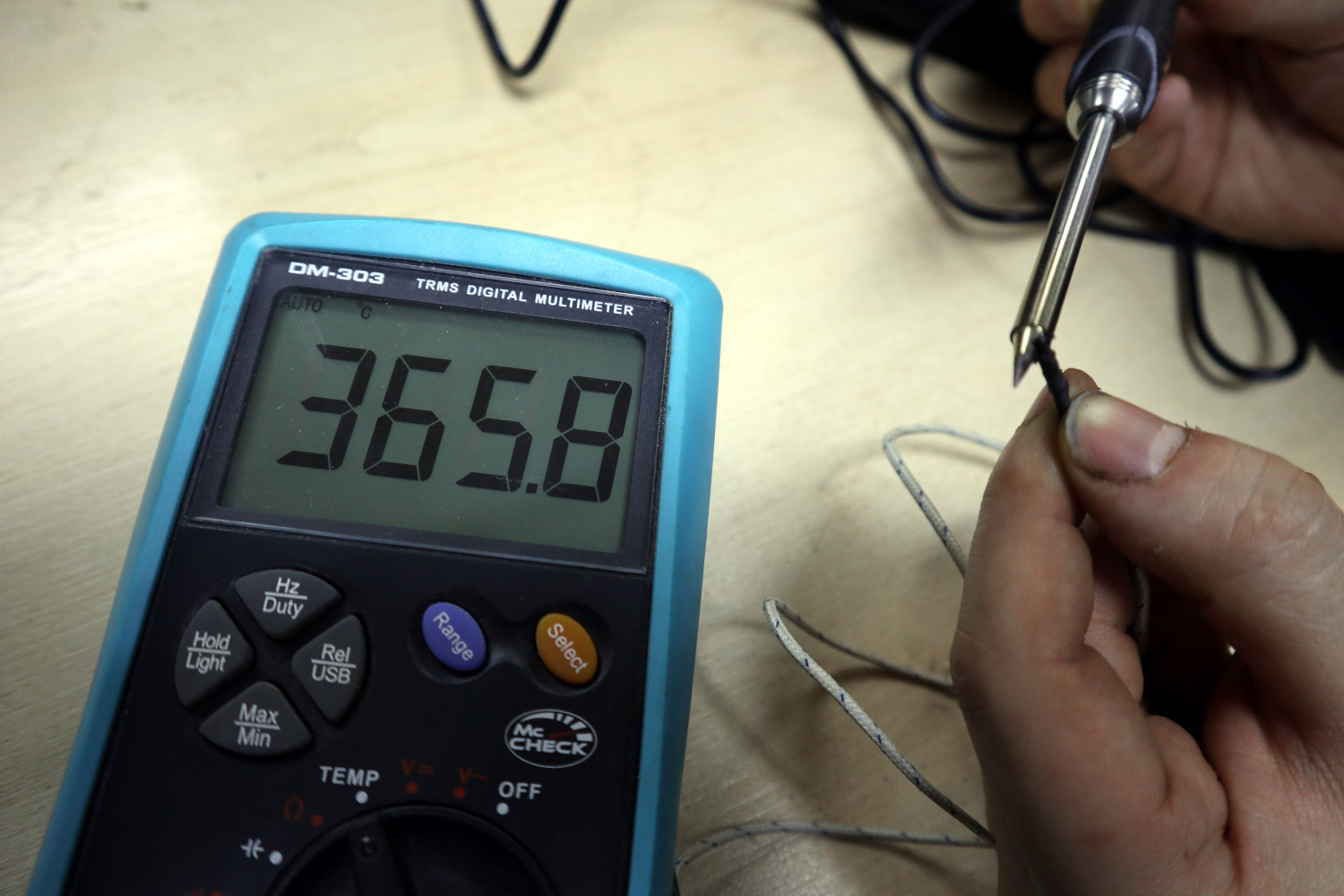
The element is not identical to the TS100 unit, but follows a similar format of all-in-one tip and element with contacts brought out to metal bands on a ceramic end piece. It’s secured in place with a screw-on metal collar to which I guess you could attach an earth lead if needed. There are seven different tip styles and I suspect it will be an element originally designed for another iron, I chose the finest point as I will use the iron for SMD work. The whole is noticeably a bit lighter than the TS100, but the extra 5 mm length is not really an issue.
It takes the same power supply as its more expensive rival, so you may even already have a laptop supply with the correct jack and polarity. It will run from 12 V to 24 V supplies, with a claimed power of 65 W at 24 V. My 19 V supply should give it a respectable 40 W. My first act on plugging it in was to take out a thermocouple and measure its temperature. The lowest I could set it was about 200 °C and the highest around 410 °C. It was easy enough to adjust to my desired 360 °C, and on checking the control knob with a magnifier its calibration wasn’t too far wrong.
To put it through its paces, it was applied to a bit of SMD reworking on a scrap board, some soldering on a protoboard project, and some wiring for a hackerspace CNC controller project. What more do you want from an iron of this type, than that it is light weight and easy to manoeuvre into position, heats up quickly, and has plenty of power? In these it delivered admirably, and the experience was similar to using a TS100 right down to the minor annoyance of a slightly inflexible power lead. This is a useful little iron, and easily coped with all the general purpose soldering we had to hand.
Old-School Analogue Temperature Control, But It Works
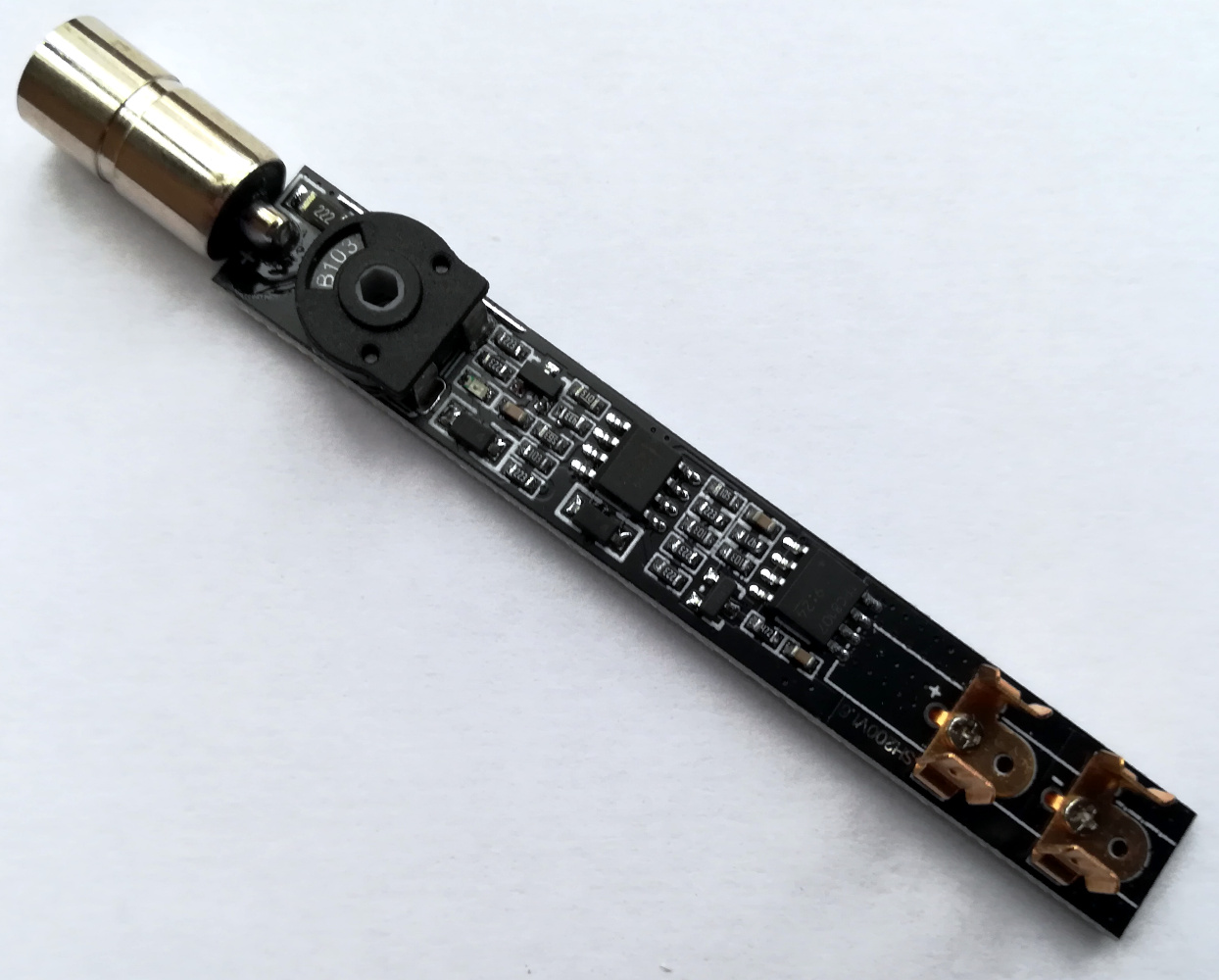
To merely describe an iron’s appearance and put it through its paces is not really a full review though, this is Hackaday. What’s inside the SH72, what makes it tick? I opened it up to take a look. It’s straightforward enough to get inside, but perhaps it’s not designed for repeated opening. The control knob eases out, and the two halves of the case can be parted with some very careful leverage and spudger work. Inside there is a long PCB covered in surface mount components on one side, spring clips for the element at one end, and a DC jack socket at the other, with a large through-hole preset potentiometer into which the control knob locates. The two main semiconductors are a TPC8107 MOSFET and an LM2904 dual op-amp, both in SOIC-8 packaging. At a guess one op-amp is a DC amplifier using the element resistance as a temperature sensor, while the other is a comparator that switches in and out the MOSFET to power the element. It’s a simple but effective temperature controller of the type that not so long ago could be found inside much more expensive temperature controlled soldering stations.
In conclusion, the SH72 looks like a cheap alternative to the TS100, and essentially that’s what it is. It’s a temperature controlled iron of similar size, power, and weight, but that’s all it does. It lacks the more expensive iron’s extra features such as standby temperatures and auto power off that come with microprocessor control, and it’s fair to say that its plastic handle is not quite so durable. It remains a very usable and useful iron though, and in answer to the question posed earlier I’d say it’s a definite diamond in the rough. At that low-budget price it’s unlikely you’ll find anything better, and you can certainly find much worse. Buy one, it won’t cost you much and I don’t think you’ll regret it.
No comments:
Post a Comment