Saturday, February 1

The fractured future of browser privacy

The fractured future of browser privacy

Enlarge

In the 1990s, web browsers like Netscape Navigator and Microsoft Internet Explorer competed bitterly to offer the snazziest new features and attract users. Today, the browser landscape looks totally different. For one thing, Chrome now dominates, controlling around two-thirds of the market on both desktop and mobile. Even more radical, though, is the recent competitive focus on privacy, a welcome change for anyone who's gotten sick of creepy ad tracking and data mismanagement. But as browsers increasingly diverge in their approaches, it's clear that not all privacy protections are created equal.

At the USENIX Enigma security conference in San Francisco this week, developers, security researchers, and privacy advocates presented differing views of how browsers should protect their users against data abuses. In a panel discussion that included representatives from Mozilla Firefox, Google Chrome, Microsoft Edge, and Brave, all participants agreed that collaboration across the industry has driven innovation and helped make privacy a priority. But some browsers are taking a hardline approach, while others prefer to increase protections within the status quo.

Read 16 remaining paragraphs | Comments

See-Through Catalytic Converter

There’s always something to be learned from taking things apart. Sometimes the parts can be used for other things, sometimes they can be repaired or improved upon, but sometimes it’s all in good fun. Especially in this case where extremely high temperatures and combustible gasses are involved. This is from the latest video from [Warped Perception] that lets us see inside of a catalytic converter as its operating.

Catalytic converters are installed on most vehicles (and other internal combustion engines) in order to process unburned hydrocarbons from exhaust gasses with a catalyst. These can get extremely hot, and this high temperature complicated the build somewhat. There were two prototypes constructed for this build and the first was a cross-section of a catalytic converter with a glass window sealed on in order to allow the viewing of the catalyst during the operation of a small engine. It was easy to see the dirty exhaust gasses entering and cleaner gasses leaving, but the window eventually blew off. The second was a complete glass tube which worked much better until the fitting on the back finally failed.

A catalytic converter isn’t something we’d normally get to see the inside of, and this video was worth watching just to see one in operation in real life. You could also learn a thing or two about high-temperature fittings as well if you’re so inclined. It might be a nice pairing with another build we’ve seen which gave us a window into a different type of combustion chamber than ones normally found on combustion engines.

Thanks to [Ryoku] for the tip!

A Nano With An Otter’s Bite

The would-be microcontroller experimenter is now faced with a bewildering array of choices when it comes to a tiny development board for their projects. Everything from descendants and clones of the original Arduino through to full-fat Linux powerhouses such as the Raspberry Pi Zero and similar boards can be had, and often for a reasonable price.

A new entrant has now joined the fray, the OtterPill is an STM32F072-based board with an Arduino-Nano-like pinout, and it comes from the bench of [Jan Henrik]. With so many competitors you might ask yourself what it can offer, and it would be a valid point given that a Nano clone can be had for relative pennies. Aside from the Nano shield compatibility and extra power of the ARM Cortex M0 then, it’s an open source development board with USB-PD included from its USB-C socket, and with some elite BoM wizardry he’s managed to get the cost of its components to below three dollars. A USB-PD example firmware is available and a blank firmware is on its way. For now the board exists only in prototype form, but he’s putting together a production run if you would like one too. We saw an early development of it at eth0 back in the autumn, and given the progress since then we’re sure that we won’t have to wait for long.

Regular readers will recognise [Jan Henrik]’s work, because otter-themed boards have made their way to these pages before. Our most recent ones were the USB-C replacement board bringing USB-PD to the TS-100 soldering iron, and  a nifty little USB board for addressable LEDs.

An Arcade Cabinet with Displays to Spare

We’ve all got a pretty good mental image of what an arcade cabinet looks like, so you probably don’t need to be reminded that traditionally they are single-screen affairs. But that idea dates back to when they were built around big and bulky CRT displays. Now that we have modern LCD, LED, and OLED panels, who says you have to follow the old rules?

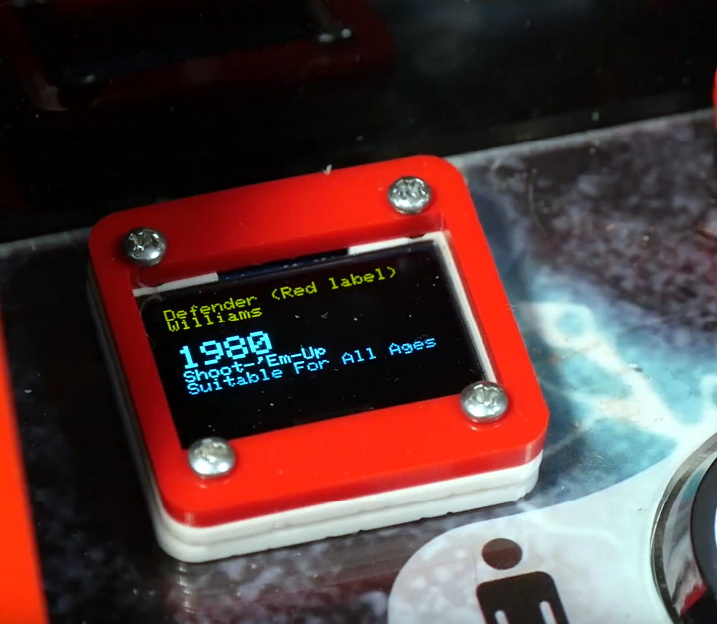
That’s precisely the sort of out of the box thinking that lead [Al Linke] to build this unique multi-display arcade cabinet. The game itself is still played on a single screen, but several smaller sub-displays are dotted all around the cabinet to indicate various bits of ancillary information. Are they necessary? Hardly. But we can’t deny it’s a clever idea, and we wouldn’t be surprised if we start seeing something similar in other DIY cabinets.

The build started with a commercially available cabinet from Arcade1Up, which at this point are popular enough that some of the Big Box retailers have them in stock. All of the electronics except for the display were stripped out, and replaced with a Dell OptiPlex 9020 computer and high-quality joysticks and buttons. [Al] then installed his various displays all over the cabinet, including a gorgeous LED marquee that we’ve featured previously.

So what do all these little screens do? [Al] explains them in the video after the break, but the general idea is that they provide contextual information about the game you currently have loaded up. A two-color OLED display shows the name of the game and what it’s rated, while a seven segment LED display shows the year the game was released. The displays are located both by the controls and where you’d expect the coin slot to be, so whether you’re actively playing or across the room, you can see all the information.

We’re always amazed to see how builders find ways to make their own personal arcade cabinets stand out. While it’s an idea that at this point we’ve seen quite a lot of, no two projects have ever been quite the same.

Fast & Furious 9 trailer: The only 4 minutes of the film you’ll need to watch

Vin Diesel returns as Dominic Toretto in Fast & Furious 9, directed by Justin Lin.

Universal Pictures has dropped the first full trailer for Fast and Furious 9, the latest installment in its multi-billion-dollar franchise. It's nearly four full minutes of all the ridiculously over-the-top mayhem we've come to expect from Domininc Toretto (Vin Diesel) and his merry band of badass misfits. And no wonder: Director Justin Lin is back on board, who helmed 2006's Tokyo Drift and the next three installments before passing the baton to James Wan for Furious 7.

Fast and Furious 9 is the sequel to 2017's The Fate of the Furious, in which Dom is coerced into the following the orders of a cyberterrorist named Cipher (Charlize Theron). Over the course of a very convoluted plot, Dom discovers his former lover, DSS agent Elena Neves (Elsa Pataky) bore him a son. Elena doesn't survive the film, but the boy does. And of course, Dom and company end up saving the day.

News of a planned ninth and tenth film to complete the franchise broke back in 2016, with F&F9 initially slated for an April 2019 release. It was rescheduled for this year to make room for the 2019 spinoff film, Hobbs and Shaw, starring Dwayne Johnson and Jason Stratham in the title roles. There were already rumors of tension between Johnson and Diesel on the set of The Fate of the Furious, and the delay on the ninth film prompted a bitter outburst on Instagram by co-star Tyrese Gibson, who plays team member Roman Pearce in the franchise.

Read 5 remaining paragraphs | Comments

A 60 GHz Phased Array

Our friend [Hunter Scott] gave a talk at a past Supercon about created phased array antennas. He mentioned he was looking for collaborators to create an antenna with the SiBeam SB9210 chip. This is a specialized chip for WirelessHD, a more or less failed video streaming protocol, and it’s essentially an entire 60 GHz phased array on a chip with both transmit and receive capabilities. For $15, it seems like quite the bargain, and [Hunter] still wants to put the device to work.

The downside is that Lattice bought SiBeam and killed this chip — not surprising considering WirelessHD never really took off. However, [Hunter] says the chip was in some old smart TVs and laptops. If you can find replacement boards for those devices on the surplus market, you can get the chip and the supporting circuitry for a song.

The situation is a little sticky. [Hunter] has the datasheets for the parts, but is still bound by a nondisclosure agreement. He’s still working on getting that encumbrance removed. But until then, he has some advice about similar chips that have public datasheets and a controller chip that — if you would sniff its bus in a working system — might very well shed light on how to set up the cheap antenna chip.

There are also a bunch of public links that should make things clearer. However, we hope that Lattice will allow the NDA to expire on the datasheets. Meanwhile, you can catch the Supercon talk that started it all in the video below.

You might be interested in visualizing phased arrays. These are really common in radar systems.

Fixing the Flicker Afflicting a Night Light

It’s hard to part with some things, even if they’re broken and were worth next to nothing to begin with. But some things are just special, y’know? And we would say in this case, the thing was definitely worth saving.

[Taste the Code]’s daughter’s beloved night light had a terrible flickering problem, and then stopped working altogether. Eager to make her happy, he cracked it open and found that one of the wires had disconnected from the outlet pin it was soldered to. That’s a simple enough fix, but trying to solder in tight quarters where the walls are soft plastic can be quite challenging.

Once that was fixed, [Taste the Code] plugged it in to a test outlet. It’s back to working, but also back to flickering, because there is no capacitor to smooth out the signal going to the LEDs. [Taste the Code] measured the voltage drop across the output of the bridge rectifier and soldered in an electrolytic cap with more than double the necessary voltage rating, just to be safe. You can check out the video after the break.

This goes to show several things: one, you can learn from fixing and improving cheap electronics from the likes of your local dollar store. Two, you can also get some kinds of components there quite inexpensively from things like magnetic sensor-based window alarms and dirt cheap solar garden lights.

You can also do some fun stuff with those cheap IKEA lamps designed for children. Here’s an adorable cloud lamp with an RGB LED upgrade that shows the weather mood using an ESP8266.