Thursday, August 30

WideNES emulation expands NES scenes past the usual SD screen borders

Here at Ars, we're big fans of emulators that go past perfectly recreating the original hardware and move on to enhancing the game-playing experience. Whether that means converting 2D NES sprites to 3D polygons or removing latency frames after controller presses, we're there.

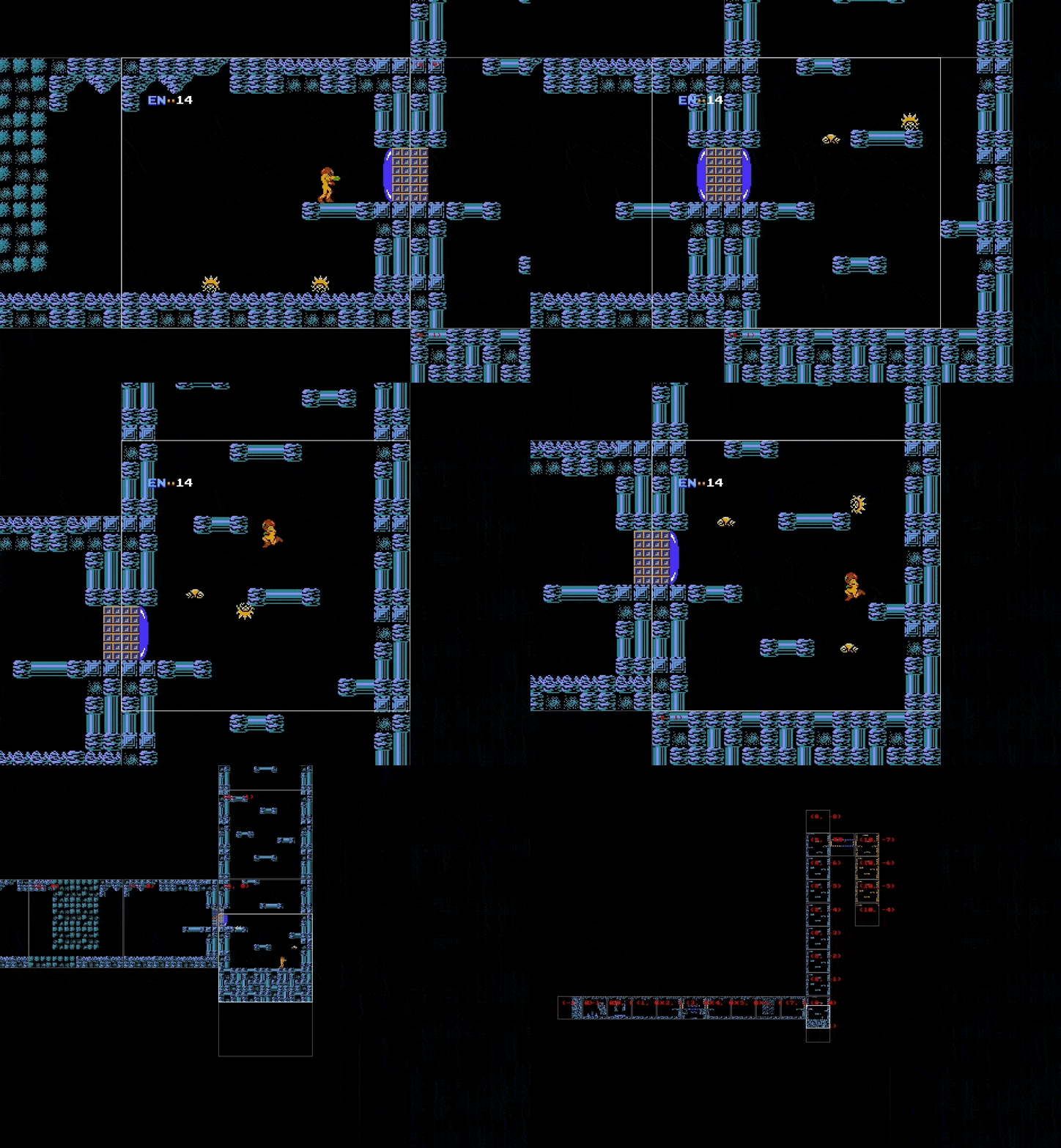
So we were more than happy to recently stumble upon WideNES, a new emulation project that extends the visible area of an NES game map past the usual 4:3, 256x240 resolution screen area we're used to. Using WideNES, you can even zoom out and pan through previous screens using the keyboard and mouse wheel while still playing the game.

The generalized methods used by WideNES are described in a fascinating blog post by University of Waterloo student Daniel Prilik, who created the algorithm. Basically, the WideNES system watches the background "map" data constantly scrolling through the emulated NES PPU as you play. It also closely monitors the PPUSCROLL register, which controls the actual screen scrolling by pointing to different parts of VRAM as the player moves.

Read 4 remaining paragraphs | Comments

Garmin’s Vivosmart 4 combines pulse-ox and a week of battery life for $129

Real or Fake? Robot Uses AI to Find Waldo

The last few weeks have seen a number of tech sites reporting on a robot which can find and point out Waldo in those “Where’s Waldo” books. Designed and built by Redpepper, and add agency. The robot arm is a UARM Metal, with a Raspberry Pi controlling the show.

A Logitech c525 webcam captures images, which are processed by the Pi with OpenCV, then sent to Google’s cloud-based AutoML Vision service. AutoML is trained with numerous images of Waldo, which are used to attempt a pattern match.  If a pattern is found, the coordinates are fed to PYUARM, and the UARM will literally point Waldo out.

While this is a totally plausible project, we have to admit a few things caught our jaundiced eye. The Logitech c525 has a field of view (FOV) of 69°. While we don’t have dimensions of the UARM Metal, it looks like the camera is less than a foot in the air. Amazon states that “Where’s Waldo Delux Edition” is 10″ x 0.2″ x 12.5″ inches. That means the open book will be 10″ x 25″. The robot is going to have a hard time imaging a surface that large in a single image. What’s more, the c525 is a 720p camera, so there isn’t a whole lot of pixel density to pattern match. Finally, there’s the rubber hand the robot uses to point out Waldo. Wouldn’t that hand block at least some of the camera’s view to the left?

We’re not going to jump out and call this one fake just yet — it is entirely possible that the robot took a mosaic of images and used that to pattern match. Redpepper may have used a bit of movie magic to make the process more interesting. What do you think? Let us know down in the comments!

The Electric Vehicles Of Electromagnetic Field: The Ottermobile And The Ottercar

If you’ve followed these pages over the last few weeks, you’ll have seen an occasional series of posts featuring the comedic electric vehicle creations of the British Hacky Racers series, which will make their debut at the forthcoming Electromagnetic Field hacker camp. So far these intrepid electro-racers have come largely from the UK hackerspace and Robot Wars communities, but it was inevitable that before too long there would arrive some competition from further afield.

[Jan Henrik] and [Niklas Fauth] are a pair of prolific German hardware hackers whose work you may have seen from time to time in other fields. When they heard about Hacky Racers with barely two weeks until they were due to set off for England for EMF, they knew they had to move fast. The Ottermobile and the Ottercar are the fruits of their labours, and for vehicles knocked together in only two or three days they show an impressive degree of sophistication.

In both cases the power comes courtesy of hoverboard wheels with integrated motors. If you cast your mind back to last year’s SHA Camp in the Netherlands, our coverage had a picture of them on a motorised armchair, so this is a drive system with which they have extensive experience. The Ottercar is based upon a lengthened Kettler kids’ tricycle with the larger variant of the hoverboard motors, and unusually it sports three-wheel drive. Control for the rear pair comes from a hoverboard controller with custom firmware, while the front is supplied by a custom board. The Ottermobile meanwhile is a converted Bobby Car, with hoverboard drive. It’s an existing build that has been brought up to the Hacky Racer rules, and looks as though it could be one of the smaller Hacky Racers.

At the time of writing there is still just about enough time to create a Hacky Racer for Electromagnetic Field. Following the example set from Germany, it’s possible that the hoverboard route could be one of the simplest ways to do it.

$99 Pinebook Gets KDE Neon Port

If you’re the kind of person who likes small and cheap Linux devices, you’re definitely alive in the perfect moment in history. It seems as if every few months we’ve got another tiny Linux board competing for our pocket change, all desperate to try to dethrone the Raspberry Pi which has already set the price bar exceptionally high (or low, as the case may be). We’ve even started to see these Linux boards work their way into appropriately cheap laptops, though so far none have really made that great of an impression.

But thanks to the efforts of Blue Systems and Pine64, the situation might be improving: they’ve worked together on a build of KDE Neon for the $99 Pinebook. The fact that they’ve gotten Plasma, KDE’s modern desktop environment, running on the rather mediocre hardware at all is an accomplishment by itself. But they’ve also set out tailor the entire system for the Pinebook, from the kernel and graphics drivers all the way up to Qt and Plasma tweaks.

In a blog post announcing the release candidate of the OS, Neon developer [Jonathan Riddell] says that these top-to-bottom improvements show that you can turn a super cheap Linux laptop into a practical computer if you’re willing to really get in there and optimize it. He also says the project has been something of a two-way street, in that improvements made for the Pinebook build have also been applied to upstream development.

The last time we looked at the Pinebook, we came away cautiously optimistic. It wasn’t great, but it was about as good as you could possibly expect given the price. If more developers are willing to go out on a limb and start optimizing their software for the device, it might become a very promising platform for low-cost mobile hacking.

Governor’s desk last stop to California pledging 100% carbon-free energy by 2045

Linux Fu: Modernize Your Command Line

If you use Linux and its associated tools on the desktop or on a Raspberry Pi, or on a server, you probably have used the command line. Some people love it and some people hate it. However, many of us have been using Linux for years and sometimes Unix before that, and we tend to use the same old tried-and-true tools. [Remy Sharp] had a recent post talking about how he had created aliases to replace those old tools with great modern replacements and it is definitely worth a read.

We’ll be honest, when we first saw the post we almost skipped reading it. A lot of Linux tip posts are pretty uninteresting unless you are a total beginner. But [Remy] has a lot of really great tools and how he has them installed including bat, which is like cat but with syntax coloring (see picture above), and fzf — a command line history search on steroids. He even shows how to join fzf and bat to make a very cool file browser from the command line (see below).

That’s not all of the replacements, either. He had htop of course, which we’ve used for a long time. There are some nicer replacements for htop, like glance. There was also prettyping (that is pretty ping, not pret typing) which is a nice alternative to ping. We were less convinced of the need to replace find and grep because we are pretty happy with them and we have our own favorite replacement for diff which does launch a GUI, so we didn’t try those.

You might not like all the choices on the list — we didn’t. But that’s the nice thing about Linux. You can use what you want, more or less. Which is another of our favorite aliases, replacing more with less. We also like cdfunc and fasd and we manage all that madness using a system for putting .bash.rc under git control. That also keeps it synchronized between machines.

If you like tools to help run your system, we talked about a few before. If you don’t care for [Remy’s] choice of tldr instead of man, you might like our take on help for Bash. Of course, if you don’t mind abandoning bash, we know lots of people like Fish and zsh which have a lot of additional features, too.